Discounts, gift cards and credits on the same order, no sales tax when you sell stored value, and a new Stored Value dashboard.
Discounts, gift cards, and credits can all be applied on the same order
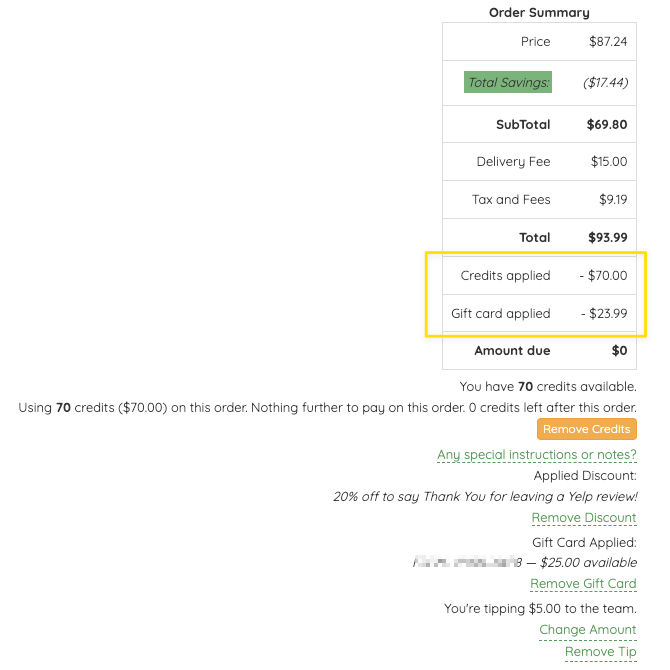
Gift cards now get their own field at checkout, right next to the discount code. That means a customer can use a discount code, a gift card, and their credits on one order.
Even better, gift cards and credits can now pay for the whole order, including tax, delivery, site fees and tips. If a customer's credit balance covers it, they pay nothing out of pocket.
All credits are valued at $1 per credit, and can be applied fractionally down to the cent. The receipt and the order confirmation email show it clearly: the order total first, then what credits and the gift card paid, then what was charged to the card.
No sales tax when you sell gift cards or credits
Selling a gift card or a credits plan no longer adds sales tax. A gift card or a credit balance is money on account: nothing is bought yet. Tax is charged when the customer spends that balance on an order, and the balance pays it along with everything else.
Products plans and package plans are unchanged. Those still charge tax when sold, because that sale is the purchase. Credits plans renew at their plan price, without a tax line.
- The gift card purchase page shows the card's face value, with no tax added.
- The tax setting is gone from voucher options and credits plan edit pages, since it no longer applies.
Stored Value balances & tax reconciliation
A new Stored Value admin section, under Discounts and on the Reports page, shows the credits and gift card balances on your customers' accounts.
Balances shows outstanding credits and gift card balances, where they came from, when gift cards expire, and how long credit balances have gone unused.
Tax Reconciliation filters by gift cards or credits, sorts any column, and exports what's on screen to CSV for your accountant. If you charged tax on gift cards or credits in the past, it lists the customers who paid that tax up front and how much they're owed, and lets you credit them back in a click: one customer at a time, or everyone in the current view. Every action asks you to confirm first, and each customer gets an email when you apply.
Anyone with the accounting role or above can view the reports. Crediting customers needs manager or above.
A few other updates...
- Expired discount codes no longer hold up scheduled orders. When a scheduled or bulk finalize finds a discount code on a pending order that has expired or is used up, the order goes through at the regular price instead of being held back for the cycle.
- Admin menu tidy-up. Fees moved under Orders. Voucher Options, Voucher Purchases and the new Stored Value report are under Discounts.
- Delivery windows read in full. When an order's schedule group delivers over two days, the customer's order details show the whole window (for example, Saturday–Sunday) instead of only the first day.