Expire credits nobody has used in a year or more, open an order or a customer by its number, and spam checks on your forms.
Expire credits nobody has used in a year or more
In the September 15 update we said an easy way to expire old balances was coming. Here it is.
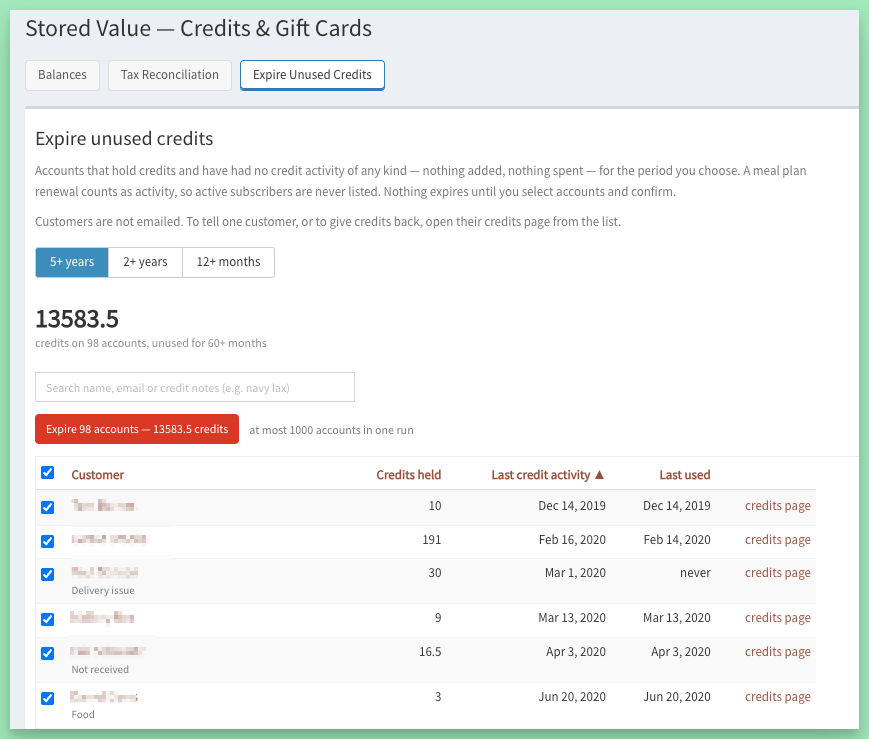
Stored Value (under Discounts, and on the Reports page) has a new Expire Unused Credits tab.
Pick an age, 12 months or longer, and the tab lists every account holding credits with no credit activity at all in that time: no credits added, spent, or expired. A plan renewal that topped a balance up counts as activity, so live accounts stay off the list.
From there you can search by customer name or by the notes your staff typed on a credit change, sort any column, and export the list with each customer's email address and marketing opt-out. That is handy if you would rather write to them first, or run a winback campaign.
Then tick the accounts you want and expire them.
A few things worth knowing before you use it:
- 12 months is the floor. If you need a more aggressive policy, let us know.
- Customers are not emailed. These are mostly long-dead addresses, and a few hundred bounces in one go would hurt your sending reputation. You get one summary of the run instead.
- It is reversible. Every account's credit history records the run, who ran it, and the date. If a customer comes back, add the credits again from their credits page.
- Nothing expires on its own. Credits only go when you click.
- Running it needs the manager role. Accounting can look at the list without expiring anything.
Your site's terms now say this too. The default terms of service gain an Account Credits section: credits can be used on future orders, have no cash value, and expire after 12 months of non-use. If your site uses custom terms, update yours too.
Quick lookups for orders & customers
On the Orders dashboard, type an order number and press Enter, and the order opens. On the Customers dashboard, do the same with a customer number. Both lookups skip any other search filters set on the page, and they find disabled customers and inactive orders too.
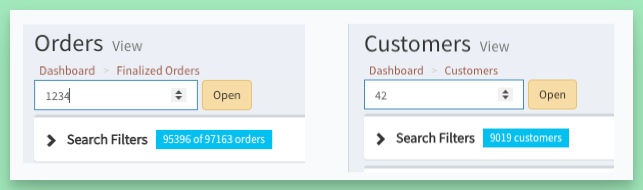
The Customers dashboard search filters also gained name, email, phone or address. Phone matches on digits, and the Address and Deliverable columns show each customer's primary address from their address book.
Contact form spam, handled
This one shipped earlier in the year and never made it into an update.
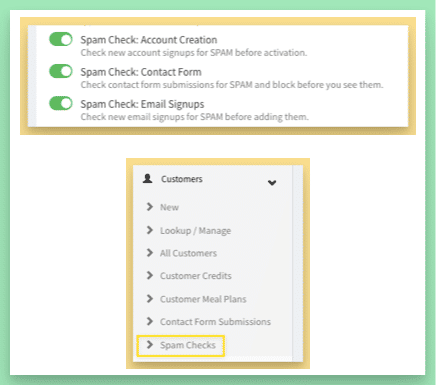
Several layers of filtering catch spam and bad data before it reaches your database and your staff's inbox. It covers:
- Account creation
- Contact forms
- Email signups
Submissions are scored on a number of factors and go through several filters, including a managed service. Likely spam is dropped automatically.
A Spam Checks admin page lets you review what was caught and change the ruling, and you get a monthly summary email. If you do not see the page or the summary, the checks are off on your site: turn them on from the Features page, or ask us.
Email signups on your own site. An email signup form can store the signup on your site with no email service connected, email you when someone signs up, spam-check it, and still forward to Mailchimp if you use it. Export the list and use it with any email service.
Bounced addresses are recorded automatically. When mail to a customer hard-bounces, the address is flagged and the customer sees a notice on their account page asking them to fix it. A wrong address gets corrected by the person who owns it, instead of quietly failing.
A few other updates...
- Order totals, de-mystified. Order pages and the printed slip list the items, subtotal, tax, fees and discount, then the total, then what paid it: credits, gift card, card.
- Take a gift card off a pending order from the admin. The admin pending order page shows the card with a remove link, so an order held up by a card that no longer works can be finalized by hand.
- See who turned SMS off, and why. The Messaging dashboard shows who switched texting off, when, and the reason.
- Cleaner pasting in the editor. Pasting from Word, Docs or Mail no longer drags in table and background styling, and there is a proper remove formatting option.
- Open Analytics Dashboard goes straight to your Fathom Analytics stats, with no password needed.
- Undo when you remove a meal on menu edit. Nothing is dropped until you press Update.
- Straight to Stripe. Payments made through Stripe link directly to the Stripe charge from customer billing and from payments in user management.