When is impersonation a good thing?
When it's helping you help your customers of course!
Account Impersonation is a powerful tool that allows you to "log in as" a customer to assist with their account (or even place an order on their behalf) using the same view that they see.
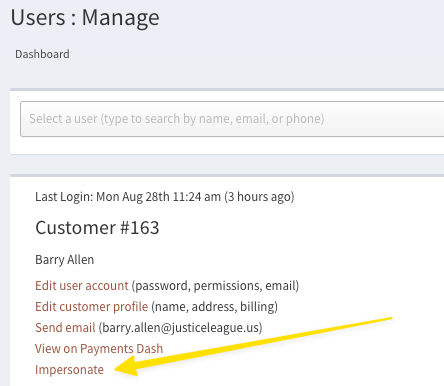
Access it from the user management page after pulling up a customer:
We've made a few changes to improve the experience of this feature:
- There will now be a persistent notification in the top left of your screen while impersonation is active:
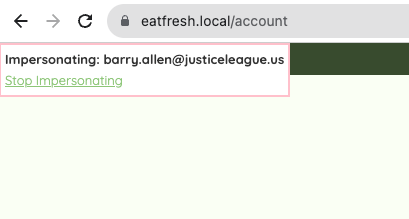
After you're finished with impersonation, you can now click "Stop Impersonating" to end your session.
You no longer need to close other tabs/windows! Any other open pages will now be masked automatically during impersonation and will be accessible again when you're finished. Opening a new tab/window with your current login during an impersonation session will still end your session.
After impersonation is concluded, the page will redirect back to the user management page for the user that was being impersonated.