March Report Changes
Customer Order Counts
The Customer Order Counts report has been available on some sites on the Reports page, and shows an individual total order count for every customer on your site.
Updates to this report:
- Added 1-click sorting to headers, to sort by any field (e.g. name, order count, date)
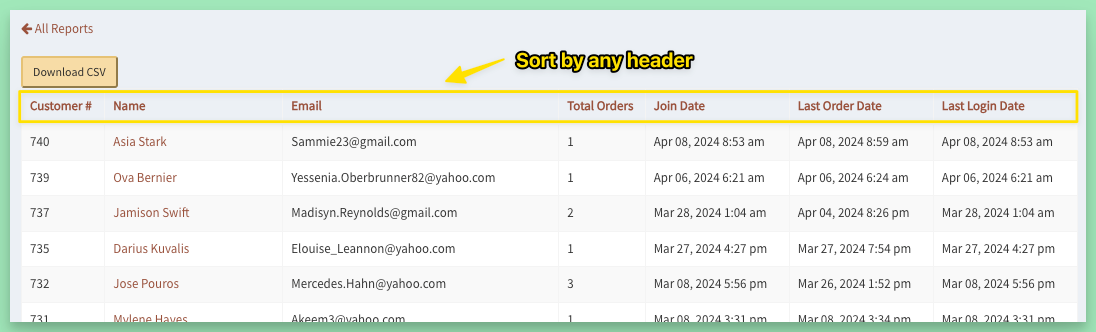
- A CSV is no longer auto-downloaded, but still available if needed
- The report is much faster (just a few seconds even for 1000s of customers)
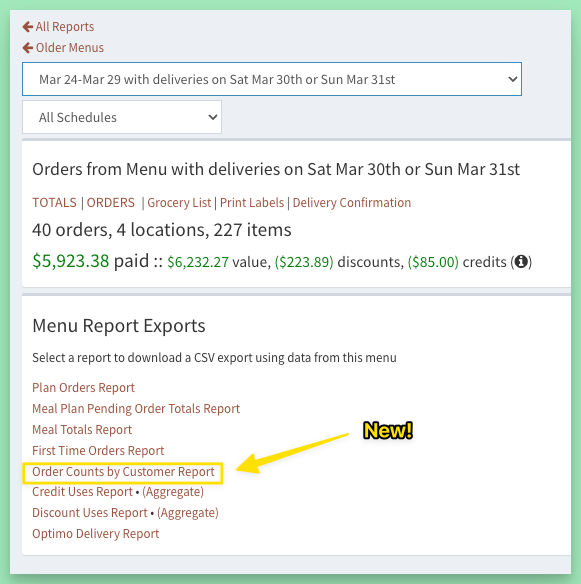
In addition, the report is now available under Menu Exports — useful if you want to check for customers with multiple orders for the week or simply get a list of all the customers for the week (perhaps for a targeted email campaign).
Discount Uses
This report is available on the Reports page in an aggregate or itemized view.
The aggregate view gives a summarized count for each discount across all orders you've ever processed.
The itemized version lists every single discount use, along with the associated order and customer.
Updates to this report:
- Added an "Active" col to show you if the discount is currently active on your site
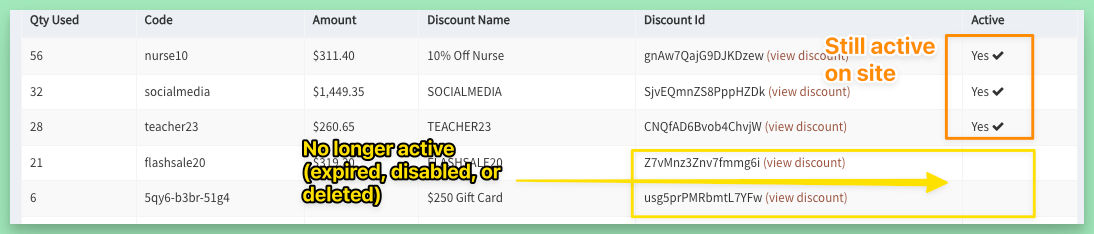
- Changed the default sort to "Order Date" on the itemized view
- The report is much faster (less than 1 second per 1000 discount uses)
On the aggregate view, the grouping for discount uses has changed. Discounts with the same id, but different names or codes will be grouped by the code instead of the id. This allows you to track the usage counts separately in the event that a discount was deleted or renamed.
Other Report Changes
When running some All Time reports, an estimated completion time is shown. In some cases, the estimated time was way off - this is now fixed.
The All-Time Discount Report has been split into 2 reports (Itemized & Aggregate) with separate links

On the itemized versions of the monthly reports, we've swapped the location of 2 links: the link on the gross amount now goes to the payment page for that order, and the link on the net amount goes to the payment processor page for that payment
