April 2025 Update
Highlighted improvements and fixes from the prior month, including updates to Integrations, Mailchimp Tagging, Multi-Schedule Menus, Customer LTV stats, Menu Previews, Order Page, Plan Orders, and more...
Customer LTV
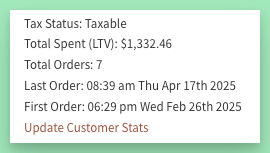
Find these stats on the user management page, as well as in relevant reports and exports (e.g. First Time Orders, Customer Order Counts, et al).
Stats are updated automatically with each new order.
Integrations
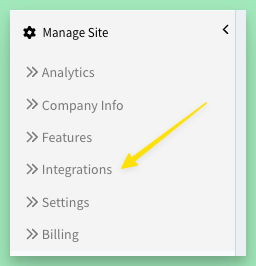
Watch this page for info on existing and new integrations as they get moved here.
Speaking of integrations, a new MailChimp tagging feature was just launched that syncs the first several orders for customers so you can set up email campaigns based on those initial orders.
Multi-Schedule Support
- Set any start/end date & delivery date for your menus. A few days, a few weeks, a month - anything!
- Permanently changing your normal schedule? Use the new "Save ... as Default" to make future menu edits easier.
- Adding an additional delivery day? Use the new "Add Schedule" option.
- Additional schedules support having the same or different start or end date.

Example of a split-week multi-schedule view:
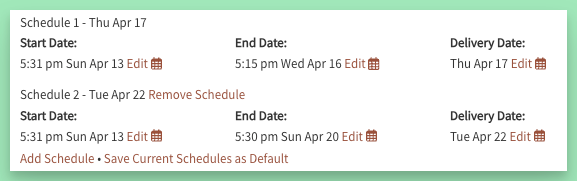
You may notice the upgraded date views and date pickers as well. These new, more mobile-friendly, pickers will be gradually updated throughout the admin.
Orders

Help modal upgraded with faster and more accurate in-page hot-links
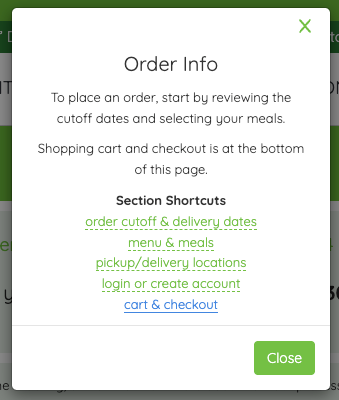
In addition, the page now more consistently refreshes automatically when menus are closed and then opened with the same or a new menu.
Other Improvements & Fixes
- can now run the job to finalize plan pending orders directly from the dashboard
- if a plan order fails to finalize with the cron job, it will be flagged and skipped in future job runs and must be finalized manually (individually or with new dash button)
- standardized the email subject for new orders
- fixed an issue with a pending order not saving when all meals removed
- fixed an issue with the last 4 of a customer's card not showing in billing sections
- fixed an issue with Partners insert